Blog
What makes RTX Pro 6000 96GB a good GPU for AI inference?
How the NVIDIA RTX Pro 6000 Blackwell Server Edition with 96GB VRAM fits open-model inference on EcoHash, which model sizes it suits, how it compares to other GPUs, and how to access it.
The RTX Pro 6000 Blackwell Server Edition gives you 96 GB of GDDR7 on one card, and for inference that capacity is the whole point. 96 GB holds a 20B to 35B open model with room left for KV cache and larger batches, so you serve it on a single GPU instead of splitting it across several. In the size range most teams actually deploy, that keeps both latency and operations simpler. On EcoHash the same card backs three ways to use it, a shared OpenAI-compatible API, a dedicated endpoint, and an hourly GPU workspace, and you move between them without changing the model or your code. It is a strong fit for mid-sized open models, and it is not the card for the very largest ones.
96 GB on one card. A 20B to 35B open model, its KV cache, and real batch sizes fit on a single GPU at $1.98 per hour.
Who this is for
Developers checking whether a single 96 GB card can host the open model they want to serve.
Teams weighing a shared model API against dedicated or self-managed GPU capacity.
Anyone sizing an RTX Pro 6000 for 20B to 35B models before spending on it.
What you can decide
Whether your model fits on one card, or needs quantization or more GPUs.
Which EcoHash path fits your stage: shared API, dedicated endpoint, or workspace.
When a model is large enough that a different GPU is the better call.
Facts
Hardware: NVIDIA RTX Pro 6000 Blackwell Server Edition
VRAM: 96 GB GDDR7
Architecture: Blackwell generation
Interconnect: PCIe (single-GPU and multi-instance inference)
Best-fit models: 20B to 35B open models, plus selected quantized larger models
EcoHash GPU price: $1.98 per GPU-hour (/pricing)
Access on EcoHash: Shared API, dedicated endpoint, GPU workspace
API base URL:
https://api.ecohash.com/v1
Why 96 GB matters
VRAM sets the ceiling on what you can serve. The weights have to fit, and so does the KV cache, which grows with batch size and context length. Once the weights eat most of the card, you are left with small batches, short context, or a model split across GPUs.
96 GB changes that math for mid-sized models. A 30B-class model in a memory-efficient format still leaves room for concurrent requests and long prompts on one card, so you skip tensor-parallel serving and the latency and operational overhead that come with it. A 7B or 13B model has even more headroom, which you spend on bigger batches and longer context rather than leaving idle.
Blackwell, on a single card
The RTX Pro 6000 is a Blackwell-generation card on PCIe. EcoHash runs it as single-GPU and multi-instance capacity rather than an NVLink cluster, which suits inference: one card serves one model, or hosts a few smaller ones side by side.
Blackwell also handles the low-precision formats modern inference leans on, such as FP8, which lets a larger model fit in the same memory and can lift throughput. How much depends on the model and the serving stack, so treat the 96 GB as a fixed fact and treat quantization gains as something to measure on your own workload.
How it compares to other inference GPUs
These are published hardware specs, not EcoHash benchmarks, and they are here for context. EcoHash's card is the RTX Pro 6000; see /pricing for what we offer.
RTX Pro 6000 (Blackwell) · VRAM: 96 GB GDDR7 · Interconnect: PCIe · Typical best fit: Single-GPU serving of 20B to 35B models; headroom on smaller ones
RTX 6000 Ada (previous gen) · VRAM: 48 GB GDDR6 · Interconnect: PCIe · Typical best fit: Smaller models, tighter memory budgets
L40S · VRAM: 48 GB GDDR6 · Interconnect: PCIe · Typical best fit: Cost-focused serving of smaller models
H100 · VRAM: 80 GB HBM3 · Interconnect: NVLink · Typical best fit: High-throughput and multi-GPU serving of large models
H200 · VRAM: 141 GB HBM3e · Interconnect: NVLink · Typical best fit: Very large models and long-context workloads
The H100 and H200 use HBM with higher bandwidth and NVLink, which favors large models and multi-GPU tensor parallelism. The RTX Pro 6000 trades some of that bandwidth for a large, cost-effective single-card budget, and it is at its best when the model fits on one card.
What fits on 96 GB
7B to 13B · Fit on one 96 GB card: Comfortable · Notes: Room for large batches and long context
20B to 35B · Fit on one 96 GB card: The sweet spot · Notes: For example
qwen3-coder-30b-a3b-instruct,gpt-oss-20bAround 70B · Fit on one 96 GB card: Case by case · Notes: Usually needs quantization; validate first
235B and above · Fit on one 96 GB card: Not the target · Notes: Use an H200 or a multi-GPU or partner path
Model IDs are current EcoHash catalog IDs. See /models for the full list.
Measured on EcoHash
Numbers below are measured on a single RTX Pro 6000, end-to-end through the API, in July 2026. Full data, method, and charts are in ecohash-benchmarks.
Text generation, single stream:
llama-3.1-8b-instruct · TTFT (p95): 205 ms · Per-token: 7 ms · Single-stream tok/s: ~143
gpt-oss-20b · TTFT (p95): 170 ms · Per-token: 8 ms · Single-stream tok/s: ~125
qwen3-coder-30b-a3b-instruct · TTFT (p95): 30 ms · Per-token: 9 ms · Single-stream tok/s: ~111
Under concurrency the card sustains about 11,500 output tok/s on llama-3.1-8b-instruct. With 8k-token prompts, prefill reaches roughly 170k to 220k tok/s, which is why long-context and RAG are the most cost-effective way to use it. Against other providers of the same model, its time to first token is the lowest in the field:
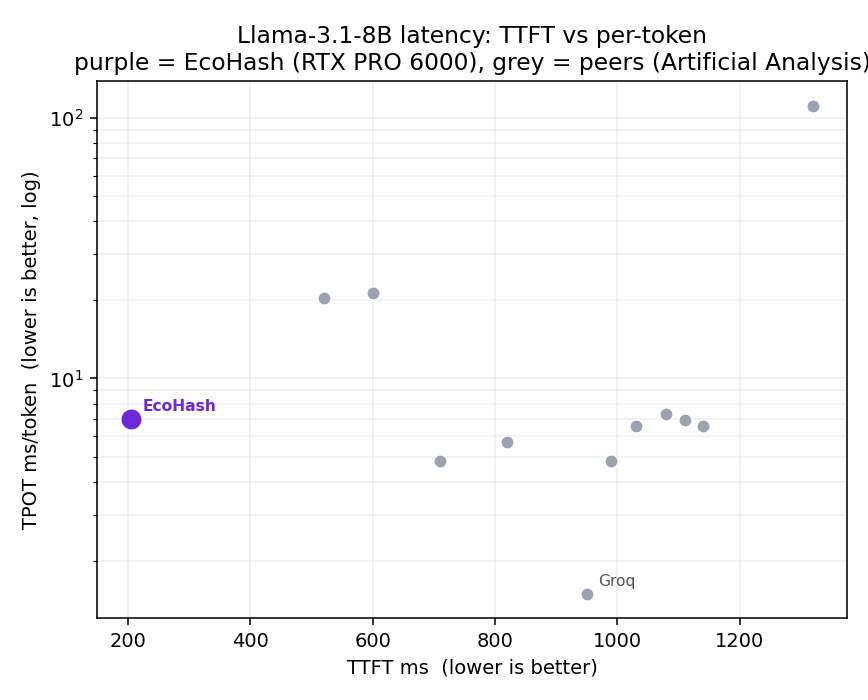
Image generation at 1024×1024:
flux2-klein · Steps: 4 · Latency: 1.2 s · Images/min: 52
z-image-turbo · Steps: 8 · Latency: 3.2 s · Images/min: 20
qwen-image · Steps: 50 · Latency: 13.4 s · Images/min: 4.6
Three ways to use it
Shared API. Call open models through the OpenAI-compatible API at
https://api.ecohash.com/v1, with no GPU to manage. Good for building and for traffic that comes in bursts. See /inference.Dedicated endpoint. Reserve capacity for one model when production traffic needs steadier throughput and predictable latency. See /dedicated-inference.
GPU workspace. Rent the card by the hour for experiments, fine-tuning, and batch jobs. See /gpu-compute.
You can start on the API and move to reserved capacity later without touching the model or the code.
Calling a model
The API is OpenAI-compatible, so existing OpenAI SDK code works once you point the base URL and key at EcoHash.
from openai import OpenAI

client = OpenAI(
    base_url="https://api.ecohash.com/v1",
    api_key="eco_...",  # create a key at console.ecohash.com
)

resp = client.chat.completions.create(
    model="qwen3-coder-30b-a3b-instruct",
    messages=[
        {"role": "user", "content": "Write a Python function that reverses a linked list."}
    ],
)
print(resp.choices[0].message.content)
curl https://api.ecohash.com/v1/chat/completions \
-H "Authorization: Bearer $ECOHASH_API_KEY" \
-H "Content-Type: application/json" \
-d '{
"model": "qwen3-coder-30b-a3b-instruct",
"messages": [{"role": "user", "content": "Write a Python function that reverses a linked list."}]
}'Validating the fit
Before you commit a model to this card:
Check that the model plus KV cache fits in 96 GB at your context length and batch size.
Pick a quantization format and compare its output against full precision on your own prompts.
Choose a serving stack such as vLLM or SGLang and pin the version.
Measure latency and throughput on your own traffic, and record the model revision, quantization, context length, framework, and driver so the numbers reproduce.
Where it falls short
96 GB is a single-card budget. Models above roughly 70B usually need quantization or more than one GPU.
Models at 235B and above are not the target. Use an H200 or a multi-GPU or partner path.
EcoHash runs the card as PCIe capacity, not an NVLink cluster, so workloads that lean on wide tensor parallelism see less benefit.
Real numbers depend on the model, quantization, batch size, and context length. Treat any performance figure as something to reproduce with its method and date.
Small and voice models do not need this card. They run through the API and move onto GPU capacity only when throughput calls for it.
FAQ
Is the RTX Pro 6000 good for AI inference? Yes, for open models in the 20B to 35B range and for smaller models at higher batch sizes. Its 96 GB lets one card serve a mid-sized model with room for context and concurrency.
How much VRAM does the RTX Pro 6000 have? 96 GB of GDDR7, on the Blackwell Server Edition that EcoHash deploys.
How does it differ from an H100 for inference? The H100 has 80 GB of HBM with higher bandwidth and NVLink, which suits large models and multi-GPU serving. The RTX Pro 6000 has 96 GB of GDDR7 over PCIe, which suits single-GPU serving of 20B to 35B models at a lower hourly cost.
What models fit on a single RTX Pro 6000 96GB? Open models up to about 35B, including qwen3-coder-30b-a3b-instruct and gpt-oss-20b. Models near 70B usually need quantization.
Can it run a 70B model? Sometimes, with quantization and reduced context or batch size. Validate the specific model and settings before relying on it.
Does it support FP8 and other low-precision formats? Blackwell supports the low-precision formats used in inference, including FP8. Confirm what your serving stack uses and check output quality before depending on it.
How much does it cost on EcoHash? $1.98 per GPU-hour. See /pricing for the current rate.
Do voice or small models need it? No. Models like Kokoro and Whisper run through the API, and move onto GPU capacity only when throughput demands it.
Next steps
Launch a GPU workspace: /gpu-compute
Browse open models: /models
Reserve steady capacity: /dedicated-inference