Blog
Qwen3 Coder 30B on RTX Pro 6000: API, dedicated endpoint, or GPU workspace?
Three ways to run Qwen3 Coder 30B on EcoHash — the shared OpenAI-compatible API, a dedicated endpoint, or an RTX Pro 6000 GPU workspace — and how to choose between them.
There are three ways to run Qwen3 Coder 30B (qwen3-coder-30b-a3b-instruct) on EcoHash, and the right one comes down to your traffic and how much control you want. The shared OpenAI-compatible API gets you a first call in minutes and bills per token, which fits prototypes and bursty traffic. A dedicated endpoint reserves capacity for steadier throughput and predictable latency in production, still with no GPU to manage. An hourly RTX Pro 6000 workspace gives you the whole card for fine-tuning, batch jobs, or your own serving stack. The model and the API contract are the same across all three, so moving up later does not mean a rewrite.
Same model, three ways to run it. Start on the per-token API, reserve a dedicated endpoint for production, rent the card itself for fine-tuning.
Facts
Model: Qwen3 Coder 30B (
qwen3-coder-30b-a3b-instruct)Type: Mixture-of-Experts, about 30B total parameters
Context on EcoHash: 32,768 tokens
API price: input $0.10 / output $0.30 per 1M tokens (/pricing)
GPU workspace: RTX Pro 6000 at $1.89/GPU-hour
API base URL:
https://api.ecohash.com/v1Hugging Face:
Qwen/Qwen3-Coder-30B-A3B-Instruct
On a single RTX Pro 6000, end-to-end, EcoHash measures it at 30 ms to first token and 9 ms per output token, about 110 tokens per second on a single stream (July 2026). A responsive coding assistant lives or dies on time to first token, and in a same-model provider comparison (llama-3.1-8b-instruct across providers, EcoHash in purple) EcoHash has the lowest in the field:
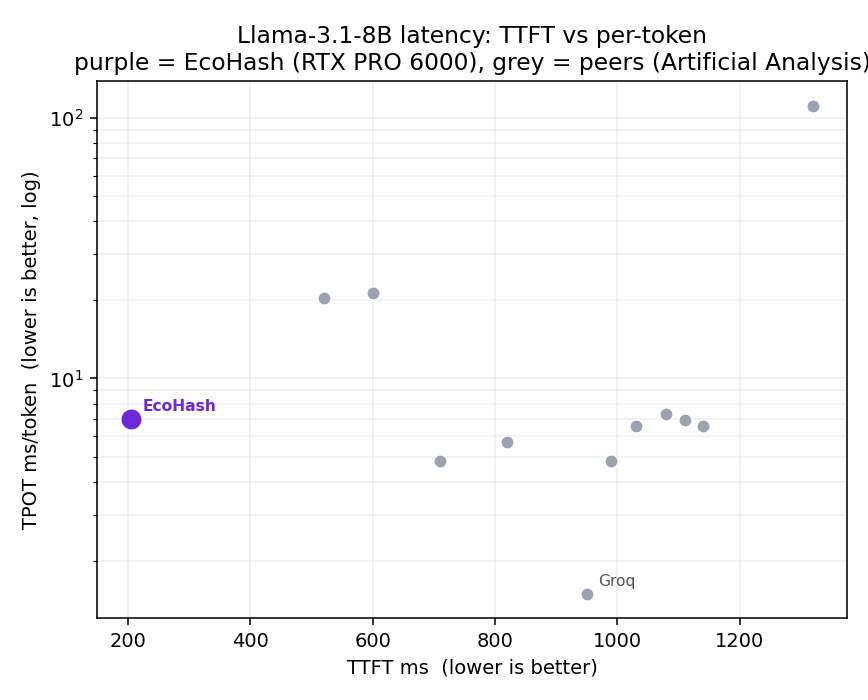
Full data, method, and charts: ecohash-benchmarks.
Who this is for
Developers adding Qwen3 Coder to a coding assistant, an agent, or a code-review tool.
Teams deciding whether to call a shared API, reserve capacity, or run their own GPU.
Anyone moving a Qwen3 Coder prototype toward steady production traffic.
What you can decide
Which of the three paths fits your current stage.
What changes and what stays the same when you move between them.
When it is worth reserving a dedicated endpoint or renting a workspace.
The shared API
The shared API serves Qwen3 Coder through an OpenAI-compatible endpoint at https://api.ecohash.com/v1. You send a request, get a completion, and pay per token. There is no GPU to provision and no capacity to plan, and because traffic runs on shared infrastructure, latency moves with overall load.
This is where most projects should start, and it suits bursty traffic well since you pay for what you use rather than for reserved capacity. See /inference.
The dedicated endpoint
A dedicated endpoint reserves capacity for Qwen3 Coder so your traffic is not competing with anyone else's. You still call the same API and still manage no GPU. What you gain is steadier throughput and more predictable latency, which starts to matter once a coding feature is in production and people expect consistent response times.
Reach for it when your traffic is steady and high enough that predictability is worth reserving capacity for. See /dedicated-inference.
The GPU workspace
A GPU workspace is an RTX Pro 6000 you rent by the hour at $1.89/GPU-hour. You get the whole card and control of the environment, so you can run a custom serving stack such as vLLM or SGLang, fine-tune with LoRA or QLoRA, or run batch jobs. Qwen3 Coder 30B fits on one 96 GB card with room for context and batching.
Reach for it when the API and dedicated endpoints do not give you enough control, or when the work is not request-response serving at all, like fine-tuning or offline batch generation. See /gpu-compute and /fine-tuning.
How the three compare
What it is · Shared API: call the model over the API · Dedicated endpoint: reserved capacity for the model · GPU workspace: rent the RTX Pro 6000 by the hour
You manage · Shared API: nothing · Dedicated endpoint: nothing · GPU workspace: the environment and serving stack
How you pay · Shared API: per token · Dedicated endpoint: reserved capacity · GPU workspace: per GPU-hour ($1.89)
Latency · Shared API: varies with shared load · Dedicated endpoint: steadier, more predictable · GPU workspace: the full card is yours
Scaling · Shared API: elastic · Dedicated endpoint: reserved throughput · GPU workspace: one card, or more on request
Best for · Shared API: prototypes, spiky traffic · Dedicated endpoint: steady production traffic · GPU workspace: fine-tuning, batch, custom serving
Where · Shared API: /inference · Dedicated endpoint: /dedicated-inference · GPU workspace: /gpu-compute
The model ID and the API contract hold across the first two, and the same model runs in the workspace, so moving between them does not force a rewrite.
Calling Qwen3 Coder
The API is OpenAI-compatible, so existing OpenAI SDK code works once you change the base URL and key. The same call works on the shared API or a dedicated endpoint.
from openai import OpenAI

client = OpenAI(
    base_url="https://api.ecohash.com/v1",
    api_key="eco_...",  # create a key at console.ecohash.com
)

resp = client.chat.completions.create(
    model="qwen3-coder-30b-a3b-instruct",
    messages=[
        {"role": "user", "content": "Write a Python function that parses an ISO 8601 timestamp into a datetime."}
    ],
)
print(resp.choices[0].message.content)
curl https://api.ecohash.com/v1/chat/completions \
-H "Authorization: Bearer $ECOHASH_API_KEY" \
-H "Content-Type: application/json" \
-d '{
"model": "qwen3-coder-30b-a3b-instruct",
"messages": [{"role": "user", "content": "Write a Python function that parses an ISO 8601 timestamp into a datetime."}]
}'When to move up
Prototype and early traffic: shared API. You are still changing prompts and shipping features, and per-token billing keeps cost tied to use.
Consistent production traffic: dedicated endpoint. Once users notice latency and volume is steady, reserved capacity buys predictability without infrastructure work.
Full control or non-serving work: GPU workspace. Fine-tuning, batch generation, and custom serving need the card itself.
You do not choose once. Plenty of teams run the API in development, a dedicated endpoint in production, and spin up a workspace only when they fine-tune.
Limitations
The context served on EcoHash is 32,768 tokens. Do not assume a larger window unless it is confirmed for EcoHash serving.
Performance depends on quantization, batch size, and context length. Reproduce any figure with its method and date.
Dedicated endpoint and workspace pricing depend on configuration. Check /pricing and /dedicated-inference.
Model IDs change as the catalog changes. Confirm
qwen3-coder-30b-a3b-instructon /models before you build.
FAQ
Can I run Qwen3 Coder 30B on an RTX Pro 6000? Yes. It is a Mixture-of-Experts model with about 30B total parameters and fits on one 96 GB RTX Pro 6000 with room for context and batching.
What is the difference between the API and a dedicated endpoint? Both use the same OpenAI-compatible API and neither asks you to manage a GPU. The shared API bills per token on shared infrastructure; a dedicated endpoint reserves capacity for steadier throughput and more predictable latency.
When should I rent a GPU workspace instead? When you need the whole card: fine-tuning with LoRA or QLoRA, batch generation, or a custom serving stack such as vLLM or SGLang.
What context length does Qwen3 Coder have on EcoHash? 32,768 tokens as served on EcoHash.
How much does Qwen3 Coder cost? Through the API, $0.10 per 1M input tokens and $0.30 per 1M output tokens. A GPU workspace is $1.89/GPU-hour. See /pricing for current rates.
Do I have to change my code to switch paths? No. The model ID and API contract stay the same across the shared API and a dedicated endpoint, and the same model runs in a workspace.
Which models pair well with Qwen3 Coder for a coding product? See Best models to run on RTX Pro 6000 96GB for embeddings, rerankers, and chat models that share the same key.
Next steps
See the model page: /models/qwen3-coder-30b-a3b-instruct
Start on the shared API: /inference
Reserve a dedicated endpoint: /dedicated-inference
Rent an RTX Pro 6000: /gpu-compute