Blog
Build a voice agent with Whisper, Kokoro, and an OpenAI-compatible API
How to build a speech-to-text to LLM to text-to-speech voice agent on EcoHash using Whisper, a chat model, and Kokoro, all through one OpenAI-compatible API key.
A voice agent turns speech into speech: it transcribes what the user says, sends the text to a language model, and speaks the reply back. On EcoHash you build all three stages through one OpenAI-compatible API and one key, so there are no three vendors and no three billing accounts to stitch together. Whisper (whisper-large-v3-turbo) does speech to text, a chat model such as llama-3.1-8b-instruct writes the reply, and Kokoro (kokoro-82m) turns it into audio. None of it needs a GPU of your own, since the models are served for you. This post walks through the pipeline, the three API calls, and when an RTX Pro 6000 workspace is worth it for heavier voice work.
Three API calls, one key. Whisper hears, a chat model thinks, Kokoro speaks. About $0.006 per minute of generated speech.
Who this is for
Developers building a voice assistant, an IVR replacement, or a spoken interface for an app.
Teams that want speech to text, an LLM, and text to speech from one provider rather than three.
Anyone prototyping a voice feature before deciding on dedicated capacity.
What you can build
A back-and-forth voice assistant that listens, thinks, and speaks.
A transcription-plus-reply feature inside an existing app.
A spoken front end for a chatbot you already run on EcoHash.
How a voice agent works
The loop has three stages, and each maps to one EcoHash endpoint:
Speech to text. The user's audio goes to Whisper, which returns text. This is the transcription endpoint.
LLM. The text goes to a chat model, which returns a reply. This is the chat completions endpoint.
Text to speech. The reply goes to Kokoro, which returns audio you play back. This is the speech endpoint.
Then you repeat for the next turn. The whole loop uses one key and one base URL, so the three stages share auth, billing, and SDK.
The models
Speech to text · Model: Whisper Large V3 Turbo · Model ID:
whisper-large-v3-turboSpeech to text (alt) · Model: Qwen3 ASR · Model ID:
qwen3-asr-1-7bLLM · Model: Llama 3.1 8B Instruct · Model ID:
llama-3.1-8b-instructText to speech · Model: Kokoro 82M · Model ID:
kokoro-82mText to speech (alt) · Model: Qwen3 TTS · Model ID:
qwen3-tts
Use a small or mid-size chat model for the LLM stage so replies come back fast. A coding-specialized model is the wrong pick for general conversation.
Here is what the speech models measure on a single RTX Pro 6000, end-to-end, in July 2026. Speech to text:
qwen3-asr-1-7b · WER %: 3.28 · Peak RTFx: 360 · Price: input $0.05/1M
whisper-large-v3 · WER %: 3.64 · Peak RTFx: 45 · Price: $0.006/min
whisper-large-v3-turbo · WER %: 4.37 · Peak RTFx: 59 · Price: $0.006/min
Text to speech:
kokoro-82m · TTFA: 120 ms · Price: $1/1M
qwen3-tts · TTFA: 2621 ms · Price: $2/1M
On the HF Open ASR Leaderboard, the models EcoHash serves land among the accurate ones (purple = served on EcoHash):
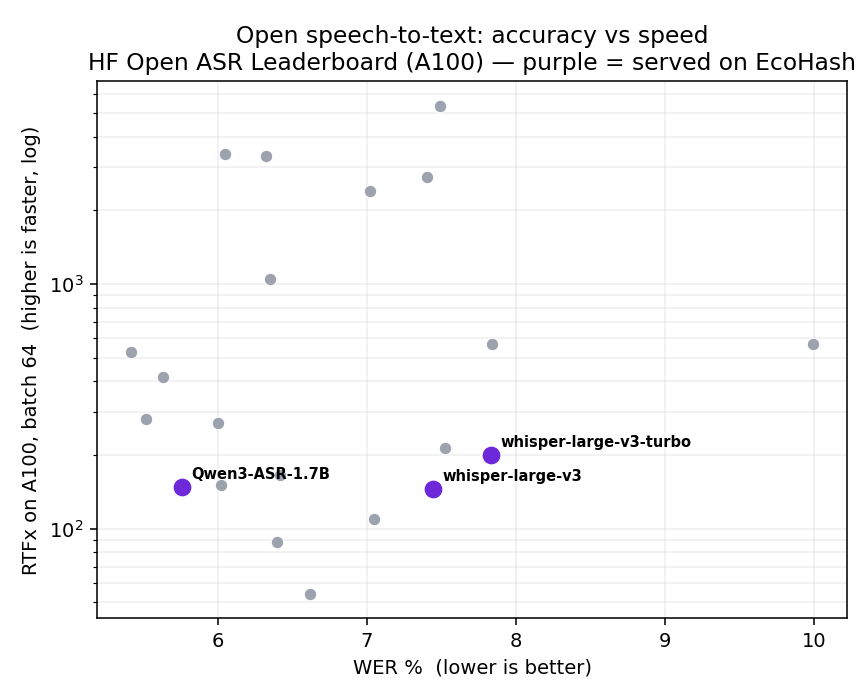
Full data and method: ecohash-benchmarks.
The three API calls
The API is OpenAI-compatible, so the OpenAI SDK works once you set the base URL and key. One client covers all three stages.
from openai import OpenAI

client = OpenAI(
    base_url="https://api.ecohash.com/v1",
    api_key="eco_...",  # create a key at console.ecohash.com
)

# 1. Speech to text
with open("input.wav", "rb") as f:
    transcript = client.audio.transcriptions.create(
        model="whisper-large-v3-turbo",
        file=f,
    ).text

# 2. LLM reply
reply = client.chat.completions.create(
    model="llama-3.1-8b-instruct",
    messages=[
        {"role": "system", "content": "You are a concise voice assistant. Keep replies short."},
        {"role": "user", "content": transcript},
    ],
).choices[0].message.content

# 3. Text to speech
with client.audio.speech.with_streaming_response.create(
    model="kokoro-82m",
    voice="af_heart",
    input=reply,
    response_format="wav",
) as speech:
    speech.stream_to_file("reply.wav")

print("You said:", transcript)
print("Assistant:", reply)
That is a full single-turn voice agent. For multi-turn, keep the message history and run the loop again for each new audio input.
Running it without a GPU
You do not need one. All three models are served through the API, so you can build and run a voice agent with no hardware to provision, and Kokoro in particular is small enough that it never needs an RTX Pro 6000.
A workspace helps later, not at the start: when you want to co-locate a heavier speech-to-text, LLM, and text-to-speech pipeline on one card, push higher throughput, or run your own serving stack. That is a scaling choice. See /gpu-compute.
Limitations
This post does not promise real-time or a specific latency. End-to-end voice latency depends on network, the models you pick, whether you stream, and your own pipeline. Measure it on your setup and cite the method and date for any number you publish.
Whisper and Kokoro do not require an RTX Pro 6000. They run through the API and move onto GPU capacity only when throughput demands it.
The example is request-response. A production voice agent adds streaming audio, voice activity detection, turn-taking, and barge-in, which are your application's job.
Model IDs and voices change. Confirm them on /models, /models/whisper-large-v3-turbo, and /models/kokoro-82m before you build.
FAQ
What is a voice agent? A system that listens, thinks, and speaks: speech to text, then an LLM, then text to speech. The user talks, and the agent replies in audio.
Which models do I need? Three: a speech-to-text model like whisper-large-v3-turbo, a chat model like llama-3.1-8b-instruct, and a text-to-speech model like kokoro-82m.
Can I do all of it with one API key? Yes. On EcoHash the transcription, chat, and speech endpoints share one base URL and one key, so there is no three-vendor integration.
Do I need an RTX Pro 6000 to run Kokoro or Whisper? No. Both run through the API. A workspace is optional, for co-locating a heavier pipeline or higher throughput.
Is it fast enough for real-time conversation? That depends on your network, model choices, streaming, and pipeline. This post does not publish latency numbers; measure your own setup before relying on a target.
Which voices does Kokoro support? Several; the example uses af_heart. See /models/kokoro-82m.
How much does a voice agent cost? The LLM stage is billed per token, and the audio stages by what they process. See /pricing for current rates.
Which chat model should I use for the LLM stage? A small or mid-size general model keeps replies quick. See Best models to run on RTX Pro 6000 96GB.
Next steps
See voice and speech on EcoHash: /use-cases/voice-speech
Speech-to-text model: /models/whisper-large-v3-turbo
Text-to-speech model: /models/kokoro-82m
Browse all models: /models